
Checkout using your account
Checkout as a new customer
Creating an account has many benefits:
- See order and shipping status
- Track order history
- Check out faster
My remote is starting on the wrong outlet (Dual Outlet Green SmartValve used with: Quartz Classic, Unity Q, Smart Link, Elisa Incite)
Q: Why is my shower starting on the "wrong" outlet?
A: The Wired Remote always starts Outlet 1 by default. The top button on the main shower controller is permanently assigned to Outlet 1 on the SmartValve, while the bottom button controls Outlet 2.
The button graphics on the controller are designed to match the standard SmartValve outlet configuration. If your shower outlets have been connected differently during installation, the controller may appear to start the "wrong" outlet.
This is not a fault with the product. To make the outlet operation align with the controller button assignments and graphics, either the pipework connections or the outlet wiring within the SmartValve will need to be reconfigured using one of the options below.
Q: How do I ensure my Wired Remote starts from the other outlet?
A: There are two ways to correct this. Before continuing, isolate the water and electrical supplies to the SmartValve.:
- Option 1 – Swap the outlet pipework: Reconfigure the pipework so that the shower outlets are connected to the opposite SmartValve outlets (Outlet 1 and Outlet 2). This is typically the easiest option if the installation is still in progress.
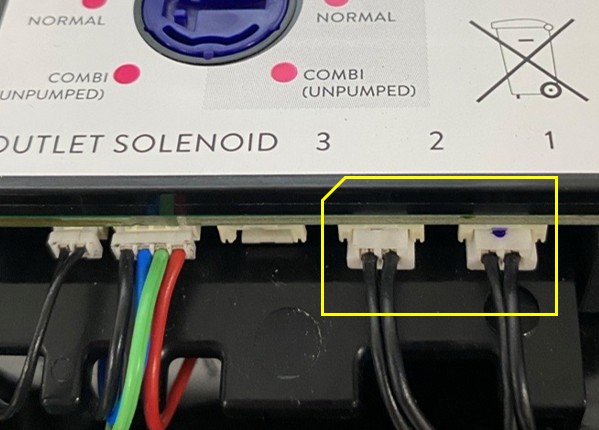
- Option 2 – Swap the solenoid connectors: If the pipework has already been completed, swap the Outlet 1 and Outlet 2 solenoid connectors on the SmartValve Logic Module instead. These are simple push-fit connectors. Disconnect each connector and plug it into the opposite port. See image below.
Either option will align the outlet operation with the controller button assignments and graphics.
Q: Which option should I choose – swapping the pipework or swapping the connectors?
A: Prior to installation completion: Swapping the pipework between Outlet 1 and Outlet 2 is usually the simplest option.
Post installation completion: If the pipework is already installed and tested, swapping the Outlet 1 and Outlet 2 solenoid connectors on the SmartValve Logic Module may be the easier solution, as it avoids any plumbing changes.
Both options achieve the same result, so the best choice depends on which is easier to access and modify during your installation.
Q: Will either option affect the labelling on my main shower controller?
A: Yes. Once either option has been carried out, the mains shower controller graphics will no longer match the physical outlets being operated. To correct this, you'll need a reversed graphics controller.
Q: What is a "reversed graphics" controller, and do I need one?
A: A reversed graphics controller has the button icons swapped so they correctly reflect which physical outlet each button controls after the outlet configuration has been changed.
If you've swapped either the outlet pipework or the solenoid connectors, you'll need a reversed graphics controller to ensure the button graphics match the outlet operation.
NEED MORE HELP?
More information: www.aqualisa.co.uk/aqualisa-app
Customer Services (for a reversed graphics controller): 01959 560010